Settings & Controls
Access the gears icon to modify settings and in-game controls. Includes performance optimization, audio adjustment, control visibility, and keybind reset.
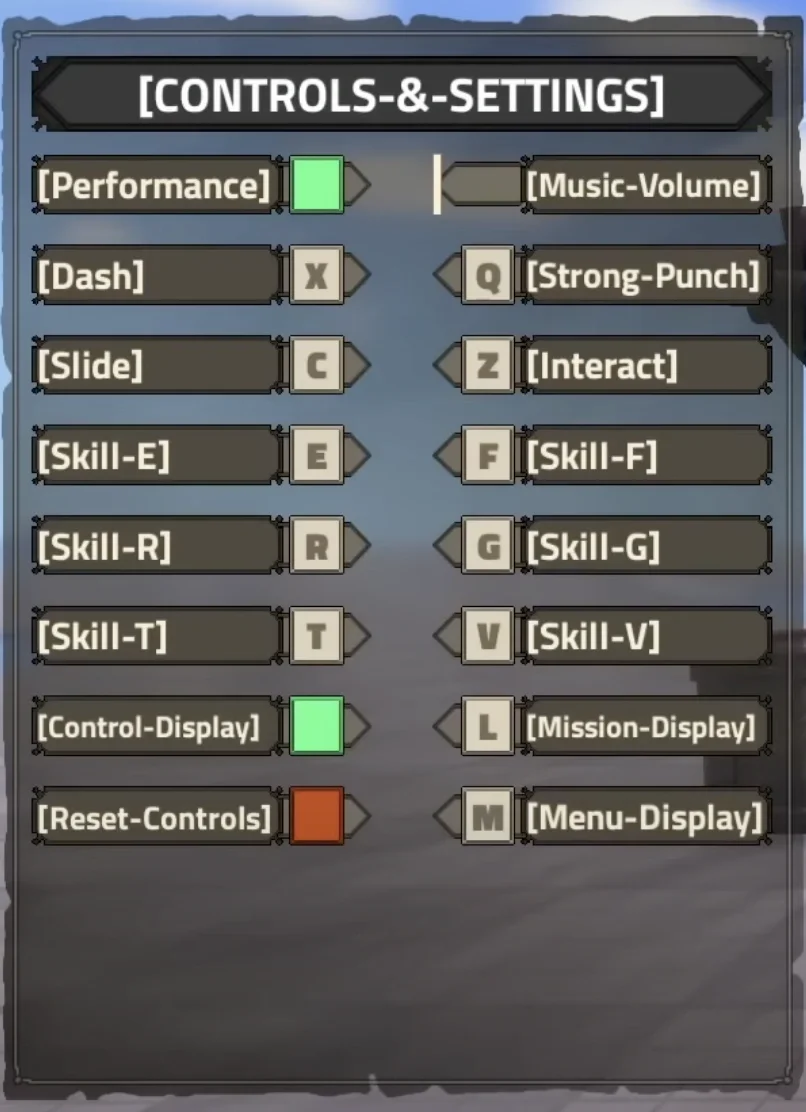
Settings can be accessed via the gears icon in the top-left corner, allowing players to adjust gameplay settings and customize control bindings.
Access the gears icon to modify settings and in-game controls. Includes performance optimization, audio adjustment, control visibility, and keybind reset.
Customizable and non-customizable control schemes for keyboard/mouse, console, and mobile platforms with detailed binding information.
| Setting | Description |
|---|---|
| Performance | Reduces textures and increases performance; recommended for lower-end devices |
| Music Volume | Adjustable from 1-10 to control background music intensity |
| Controls Display | Toggle visibility of on-screen control prompts |
| Reset Controls | Restore all keybinds to default configuration |
| Binding | Function | Bindable |
|---|---|---|
| W | Move Forward | No |
| A | Move Left | No |
| S | Move Backwards | No |
| D | Move Right | No |
| Shift | Switch to Walk/Run | No |
| Ctrl | Lock Camera | No |
| Mouse Left Click | Attack | No |
| Mouse Right Click | Defend | No |
| Q | Strong Punch | Yes |
| C | Slide | Yes |
| Z | Interact | Yes |
| E | Ability One | Yes |
| F | Ability Two | Yes |
| R | Ability Three | Yes |
| G | Ability Four | Yes |
| T | Ability Five | Yes |
| V | Ability Six | Yes |
| L | Mission Display | Yes |
| M | Menu Display | Yes |
| Command | Function |
|---|---|
| /unlock | Unlocks UI position for customization |
Settings can be accessed via the gears icon in the top-left corner, allowing players to adjust gameplay settings and customize control bindings.
Core movement controls are non-bindable; ability and utility commands allow customization. Console controls use PlayStation and Xbox layouts. Mobile supports UI repositioning via commands.
Settings is not treated as complete until concrete requirements, rewards, values, or locations are confirmed. Pending values stay out of public fields so the page remains useful without inventing mechanics.
Use this page together with related systems, activities, weapons, races, or locations linked from the same wiki cluster. The page is designed to be updated quickly when new confirmed footage or structured data appears.
