Steering Wheel
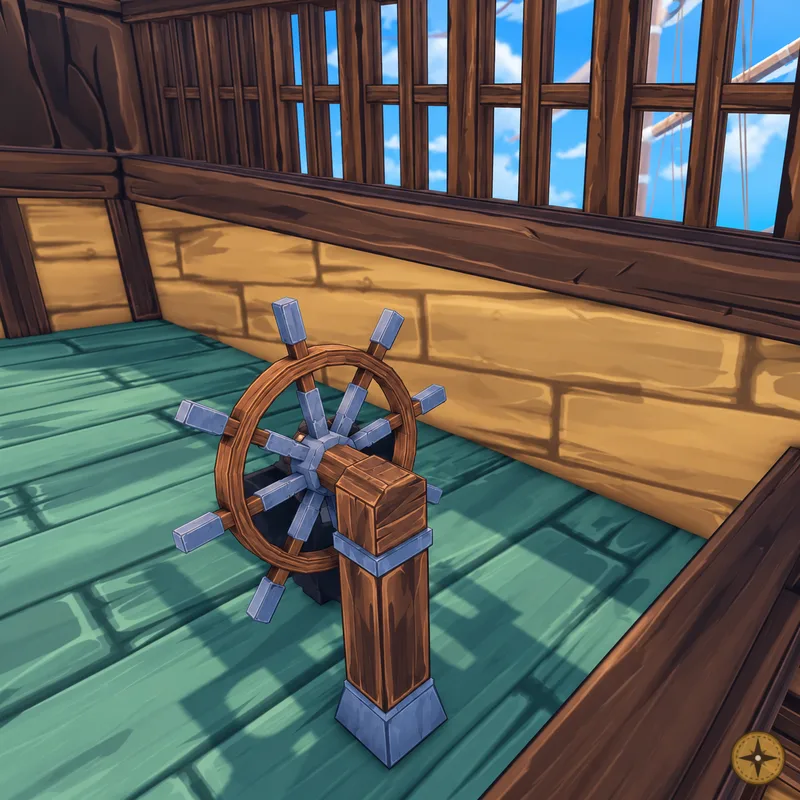
Steering Wheel is the ship's helm, the main control point for steering a vessel across sea and air travel. It sits at the stern. Interact with it to sit down, and the screen switches to a ship HUD with HEALTH, ULT and SPEED bars at the bottom right, a compass heading bar at the top and zone banners. While seated, the camera orbits the ship, and the prompt [V] Leave stands you up from the helm.
See how it worksNot confirmed yet: Handling, Turn rate, Unlock, Known steering wheels.
How it works
Notes
7- The steering wheel is the primary ship control.
- Current source data says it controls direction across the seas or through the skies.
- Steering Wheel belongs to the broader Ship Customisation and sailing systems.
- Exact stat modifiers for steering wheel variants are not confirmed yet.
- The ship HUD at the helm shows a red HEALTH bar, a blue ULT bar with a wind icon, a blue SPEED bar and small crew silhouettes under it.
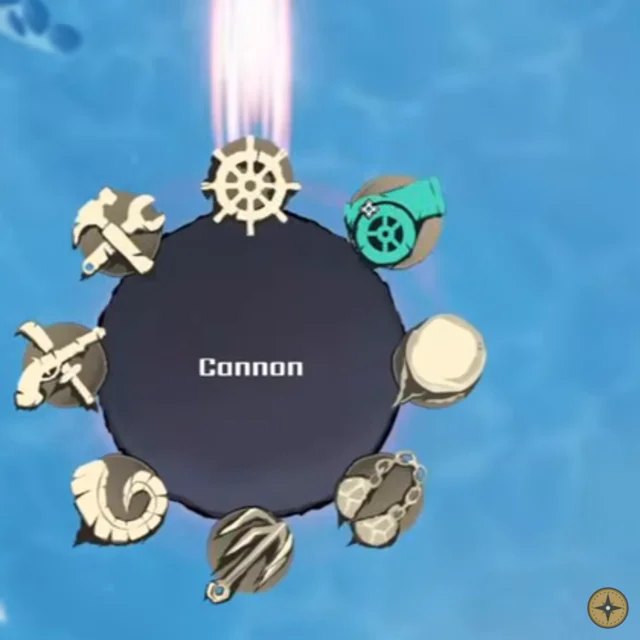
- While seated, a radial menu with 8 icons opens for ship weapons and utility. Options seen include Mortar, Grapple, Cannon, Ultimate Offense and Ultimate Utility. With the wheel open the prompt changes to [V] Disarm.
- Ship physics are fully custom, which the developers said lets them manipulate ships however they want.
Gameplay detailsThe steering wheel at the stern lets you take the helm and sail with a ship HUD.
- Walk to the wheel at the stern, interact and sit at it. Press V to leave.
- The HUD changes to a ship HUD at the bottom right with a red [HEALTH] bar, a blue [ULT] bar with a wind icon and a blue [SPEED] bar.
- A compass heading bar sits at the top, and zone banners appear while sailing.
- A radial menu with 8 icons opens ship weapons and utility, including Mortar, Grapple, Cannon, Ultimate Offense and Ultimate Utility. While it is open, V changes to [V] Disarm.
- An anchor icon sits at the left of the bottom health bar.
Not confirmed yet
- Steering keys besides V
- What the [ULT] bar fills from
- What happens when you leave the helm
Frequently asked questions
What is the Steering Wheel in RELL Seas?
Steering Wheel is the main ship control part in RELL Seas. It lets players change ship direction while traveling across the seas or through the skies.
Is Steering Wheel part of Ship Customisation?
Yes. Steering Wheel is part of the ship system and connects to Ship Customisation, sailing, and vessel control.
Are there multiple steering wheels in RELL Seas?
Current source data confirms the steering wheel as a ship control part, but variant names and stat differences are not fully confirmed yet.
Does Steering Wheel affect ship movement?
Steering Wheel controls direction, but exact movement stats such as turn speed or handling bonuses have not been confirmed for individual steering wheel variants.
How do I take the helm?
Climb aboard, walk to the wheel at the stern and interact with it to sit. The HUD changes to the ship HUD. Press V to leave the helm.
What does the helm HUD show?
A red HEALTH bar, a blue ULT bar with a wind icon and a blue SPEED bar at the bottom right, plus a compass heading bar at the top of the screen.
What does the steering wheel menu do in RELL Seas?
From the helm you open a radial menu with Disarm, Cannon, Mortar, Chainshot, Grapple, Ram and two Ultimate options. Disarm gets you off the wheel.
How do you board another ship in RELL Seas?
Sail side by side with the other ship and press G at the Board Ship prompt. Grapple lines fire across and you zipline over.